Generate PDFs in Supabase Edge Functions
Use the PDFBolt API to generate PDFs in Supabase Edge Functions. Add a Download PDF button to your app, create an invoice PDF when an order is inserted, or save PDFs to Supabase Storage. The Edge Function sends HTML or a template ID with data to PDFBolt. PDFBolt renders the PDF in Chrome, and the function returns it to your app or saves it to Storage. You don't need to run a browser inside the Edge Function.
Choose an Approach
| You need | Section | PDFBolt endpoint |
|---|---|---|
| Your AI coding agent to write the code | Generate PDFs with an AI Coding Agent | /v1/direct |
| A quick HTML to PDF test | Generate Your First PDF | /v1/direct |
| A Download PDF button in your app | Generate an Invoice PDF from Database Rows then Call the Function from Your App | /v1/direct |
| A PDF layout designed in PDFBolt | Generate a PDF from a PDFBolt Template | /v1/direct |
| A stored file and a download link | Save Generated PDFs to Supabase Storage | /v1/direct or /v1/sync |
| A PDF for every new database row | Generate PDFs Automatically with a Database Trigger | /v1/direct |
| Large PDFs or many PDFs at once | Generate Large PDFs Asynchronously | /v1/async |
Later sections reuse the tables and shared helpers from Generate an Invoice PDF from Database Rows.
The PDFBolt Free plan covers everything in this guide except direct upload from PDFBolt to Supabase Storage and asynchronous conversion, which need a paid plan. For plan limits, see Pricing and Rate Limits.
Before You Start
You need:
- A PDFBolt API key. Copy a conversion API key from API Credentials. If you don't have an account, sign up for free. No credit card is required.
- A Supabase project with users who sign in through Supabase Auth. The functions your app calls accept only signed-in users.
- Node.js to run the Supabase CLI with
npx supabase. This guide was tested with Supabase CLI 3.3.0. - Docker (optional), only to run Supabase locally. Deploys work without it: the CLI then bundles functions on Supabase's servers.
Generate PDFs with an AI Coding Agent
Paste this prompt into your AI app builder or coding agent, such as Lovable, Cursor, or Claude Code. It describes the invoice function and the Download PDF button. Adjust the table names to your schema.
Prompt for your coding agent
Add PDF generation with the PDFBolt API to this Supabase app.

1. Create a Supabase Edge Function named `generate-pdf`.
2. Export the handler as `export default { fetch: withSupabase({ auth: "user" }, handler) }`, with `withSupabase` from `npm:@supabase/server@1`, so only signed-in users can call it. `withSupabase` already answers the CORS preflight and adds CORS headers, so do not add your own CORS code. Keep `verify_jwt = false` for this function in `supabase/config.toml`.
3. Read the PDFBolt key with `Deno.env.get("PDFBOLT_API_KEY")`. Never put the key in frontend code. I will set it with `supabase secrets set PDFBOLT_API_KEY=...`.
4. The function receives `{ orderId }`. Load that order and its items with `ctx.supabase` so row-level security applies, and return 404 if it is not found. Build the invoice HTML on the server and escape every database value. Do not accept raw HTML from the browser.
5. Limit each user to 20 PDFs per hour: create a `pdf_requests` table (`user_id`, `created_at`) with row-level security enabled and no policies. Before calling PDFBolt, count the user's rows from the last hour and insert a new row with `ctx.supabaseAdmin`. Return 429 when the limit is reached.
6. Encode the HTML as Base64 of its UTF-8 bytes (plain `btoa` breaks on non-Latin characters). Send `POST https://api.pdfbolt.com/v1/direct` with the header `API-KEY` and the JSON body `{ "html": "<base64>", "format": "A4", "printBackground": true }`.
7. If PDFBolt returns an error, return status 502 with the JSON `{ "error": "PDF generation failed.", "pdfboltStatus": <PDFBolt's HTTP status>, "details": <PDFBolt's JSON body> }`. On success, return the PDFBolt response body with `Content-Type: application/pdf`.
8. In the frontend, add a "Download PDF" button that calls `supabase.functions.invoke("generate-pdf", { body: { orderId } })`. `data` is a Blob: download it with `URL.createObjectURL` and set the file name in the frontend.
If your agent can't run commands, run these yourself after it creates the code. They need the Supabase CLI linked to your project:
npx supabase db push --remote
npx supabase secrets set PDFBOLT_API_KEY=<your-api-key>
npx supabase functions deploy generate-pdf
If your coding agent has the Supabase MCP server connected, it can apply the migration and deploy the function itself with the apply_migration and deploy_edge_function tools. The Supabase MCP server has no tool for secrets, so set PDFBOLT_API_KEY with the CLI command above.
Generate Your First PDF
1. Set Up the Supabase CLI
If you already deploy Edge Functions with the Supabase CLI, skip to step 2.
In your app's folder, sign in to Supabase, create the supabase/ folder if it doesn't exist yet, and link the folder to your project:
npx supabase login
npx supabase init   # only if the project has no supabase/ folder
npx supabase link --project-ref <project-ref>
The project ref is the ID in your project URL: https://supabase.com/dashboard/project/<project-ref>. To check the link, run npx supabase functions list. It should finish without an error.
In scripts, CI, or an AI coding agent, the CLI can't ask you to confirm deploys and secret changes, so the command stops with HostedMutationConsentRequiredError. Add --yes to confirm in advance.
2. Create an HTML to PDF Edge Function
npx supabase functions new html-to-pdf
The command creates supabase/functions/html-to-pdf/ and adds a [functions.html-to-pdf] entry to supabase/config.toml. Replace the generated index.ts and deno.json:
- fetch
- Node.js SDK
import "@supabase/functions-js/edge-runtime.d.ts";
import { withSupabase } from "@supabase/server";

// PDFBolt expects HTML as Base64; btoa() alone fails on non-Latin-1 characters, so encode UTF-8 first
function toBase64(text: string): string {
  const bytes = new TextEncoder().encode(text);
  let binary = "";
  for (let i = 0; i < bytes.length; i += 0x8000) {
    binary += String.fromCharCode(...bytes.subarray(i, i + 0x8000));
  }
  return btoa(binary);
}

export default {
  // "user": only requests with a signed-in user's access token reach the handler
  fetch: withSupabase({ auth: "user" }, async (req) => {
    const apiKey = Deno.env.get("PDFBOLT_API_KEY");
    if (!apiKey) {
      return Response.json({ error: "The PDFBOLT_API_KEY secret is not set." }, { status: 500 });
    }

    const { html, filename = "document.pdf" } = await req.json().catch(() => ({}));
    if (typeof html !== "string" || html.length === 0) {
      return Response.json({ error: "Send JSON with an `html` string." }, { status: 400 });
    }

    const pdfbolt = await fetch("https://api.pdfbolt.com/v1/direct", {
      method: "POST",
      headers: { "API-KEY": apiKey, "Content-Type": "application/json" },
      body: JSON.stringify({ html: toBase64(html), format: "A4", printBackground: true }),
    });

    if (!pdfbolt.ok) {
      const details = await pdfbolt.json().catch(() => null);
      return Response.json(
        { error: "PDF generation failed.", pdfboltStatus: pdfbolt.status, details },
        { status: 502 },
      );
    }

    const safeName = String(filename).replace(/[^\w.-]/g, "_");
    // Stream the PDF through without loading it into memory
    return new Response(pdfbolt.body, {
      headers: {
        "Content-Type": "application/pdf",
        "Content-Disposition": `attachment; filename="${safeName}"`,
      },
    });
  }),
};
{
  "imports": {
    "@supabase/functions-js": "jsr:@supabase/[email protected]",
    "@supabase/server": "npm:@supabase/[email protected]"
  }
}
The PDFBolt Node.js SDK runs in Supabase Edge Functions through an npm: import and encodes the HTML for you. The later sections use fetch through a shared helper.
import "@supabase/functions-js/edge-runtime.d.ts";
import { withSupabase } from "@supabase/server";
import { PDFBolt, PDFBoltAPIError } from "@pdfbolt/node";

export default {
  fetch: withSupabase({ auth: "user" }, async (req) => {
    const apiKey = Deno.env.get("PDFBOLT_API_KEY");
    if (!apiKey) {
      return Response.json({ error: "The PDFBOLT_API_KEY secret is not set." }, { status: 500 });
    }
    const pdfbolt = new PDFBolt({ apiKey });

    const { html, filename = "document.pdf" } = await req.json().catch(() => ({}));
    if (typeof html !== "string" || html.length === 0) {
      return Response.json({ error: "Send JSON with an `html` string." }, { status: 400 });
    }

    try {
      const pdf = await pdfbolt.direct.fromHtml({ html, format: "A4", printBackground: true });
      const safeName = String(filename).replace(/[^\w.-]/g, "_");
      return new Response(pdf.buffer, {
        headers: {
          "Content-Type": "application/pdf",
          "Content-Disposition": `attachment; filename="${safeName}"`,
        },
      });
    } catch (error) {
      if (error instanceof PDFBoltAPIError) {
        return Response.json(
          {
            error: "PDF generation failed.",
            pdfboltStatus: error.statusCode,
            details: { errorCode: error.errorCode, errorMessage: error.errorMessage },
          },
          { status: 502 },
        );
      }
      throw error;
    }
  }),
};
{
  "imports": {
    "@supabase/functions-js": "jsr:@supabase/[email protected]",
    "@supabase/server": "npm:@supabase/[email protected]",
    "@pdfbolt/node": "npm:@pdfbolt/[email protected]"
  }
}
withSupabase checks the user's access token, answers CORS preflight requests, and adds CORS headers, so the function needs no auth or CORS code of its own. Keep verify_jwt = false in supabase/config.toml, as the CLI generated it.
auth: "user"The template from supabase functions new uses auth: ["publishable", "secret"]. The publishable key ships with your frontend, so anyone could use it to call the function and spend your PDFBolt conversions. With auth: "user", a request that only has the publishable key gets 401.
It accepts any HTML from any signed-in user and has no per-user limit. For a Download PDF button, use the invoice function instead. Use this one for testing, then delete it:
npx supabase functions delete html-to-pdf
3. Store the API Key as a Supabase Secret
Store your PDFBolt API key as a secret, so it stays out of your code:
npx supabase secrets set PDFBOLT_API_KEY=<your-api-key>
The function reads it with Deno.env.get("PDFBOLT_API_KEY"). A new value takes effect within seconds, without redeploying. To check it, run npx supabase secrets list. PDFBOLT_API_KEY should be in the list, shown as a hash instead of the value.

4. Deploy the Function
Deploy the function to your Supabase project:
npx supabase functions deploy html-to-pdf
The function URL is:
https://<project-ref>.supabase.co/functions/v1/html-to-pdf
If a call fails later, the function's logs are in the Supabase Dashboard under Edge Functions → html-to-pdf → Logs.
5. Test the Function with cURL
The function accepts only signed-in users, so the test needs a user's access token. You need a user who signs in to your app with email and password. If you don't have one, create a test user in the Supabase Dashboard.
Get an access token for that user. The request uses the publishable key from Settings → API Keys:
curl -X POST 'https://<project-ref>.supabase.co/auth/v1/token?grant_type=password' \
  -H 'apikey: <publishable-key>' \
  -H 'Content-Type: application/json' \
  -d '{"email": "<email>", "password": "<password>"}'
Copy access_token from the response. The token is valid for 1 hour by default. Call the function:
curl --fail-with-body --show-error -X POST 'https://<project-ref>.supabase.co/functions/v1/html-to-pdf' \
  -H 'Authorization: Bearer <access-token>' \
  -H 'Content-Type: application/json' \
  -d '{"html": "<h1>Hello from Supabase</h1>"}' \
  -o hello.pdf
Open hello.pdf. If the request fails, curl prints the HTTP status, and hello.pdf contains the function's JSON error instead of a PDF. Run cat hello.pdf to read it and see Troubleshooting.
Generate an Invoice PDF from Database Rows
In production, build the HTML on the server from your own data. The browser sends only an order ID, and row-level security (RLS) ensures each user can get PDFs only for their own orders.
Example Tables
The examples use an orders table and an order_items table. In your app, use your own tables instead, such as invoices, bookings, or reports, and change the queries and HTML to match. To run the examples as written, create these two migrations and paste the SQL below into the new files in supabase/migrations/:
npx supabase migration new orders
npx supabase migration new create_order_rpc
The first migration creates the tables and their RLS policies. Only server-side code can set pdf_path, the Storage path of the saved PDF:
supabase/migrations/20261124000001_orders.sql
-- Demo schema: orders that belong to signed-in users
create table public.orders (
  id uuid primary key default gen_random_uuid(),
  user_id uuid not null default auth.uid() references auth.users (id) on delete cascade,
  number text not null,
  customer_name text not null,
  customer_email text,
  currency text not null default 'USD',
  created_at timestamptz not null default now(),
  pdf_path text
);

create table public.order_items (
  id bigint generated always as identity primary key,
  order_id uuid not null references public.orders (id) on delete cascade,
  description text not null,
  quantity numeric(10, 2) not null check (quantity > 0),
  unit_price numeric(12, 2) not null check (unit_price >= 0)
);

create index on public.order_items (order_id);
create index on public.orders (user_id);

alter table public.orders enable row level security;
alter table public.order_items enable row level security;

-- Users can read and create only their own orders
create policy "Users read own orders" on public.orders
  for select to authenticated using (user_id = (select auth.uid()));
create policy "Users create own orders" on public.orders
  for insert to authenticated with check (user_id = (select auth.uid()) and pdf_path is null);
-- No UPDATE/DELETE policy: only server-side code (secret key) sets pdf_path

create policy "Users read own order items" on public.order_items
  for select to authenticated using (
    exists (select 1 from public.orders o where o.id = order_id and o.user_id = (select auth.uid()))
  );
create policy "Users add items to own orders" on public.order_items
  for insert to authenticated with check (
    exists (select 1 from public.orders o where o.id = order_id and o.user_id = (select auth.uid()))
  );
The second migration adds a create_order function that inserts an order and its items in one transaction. Call it from your app instead of inserting into the tables directly, so the database trigger never sees an order without items:
supabase/migrations/20261124000002_create_order_rpc.sql
-- Create an order and its items in one transaction, so the PDF trigger never sees an order without items
-- pg_net sends the request only after the transaction commits
create or replace function public.create_order(
  p_number text,
  p_customer_name text,
  p_currency text,
  p_items jsonb -- [{ "description": "...", "quantity": 1, "unit_price": 10 }]
)
returns uuid
language plpgsql
security invoker -- runs as the caller, so row-level security still applies
set search_path = ''
as $$
declare
  new_id uuid;
begin
  insert into public.orders (number, customer_name, currency)
  values (p_number, p_customer_name, p_currency)
  returning id into new_id;

  insert into public.order_items (order_id, description, quantity, unit_price)
  select new_id, i->>'description', (i->>'quantity')::numeric, (i->>'unit_price')::numeric
  from jsonb_array_elements(p_items) as i;

  return new_id;
end;
$$;

revoke execute on function public.create_order(text, text, text, jsonb) from public, anon;
grant execute on function public.create_order(text, text, text, jsonb) to authenticated;
Apply both migrations to your hosted project:
npx supabase db push --remote
Without --remote, Supabase CLI 3 applies migrations to the local database.
Add the Shared Helpers
Put code that several functions share in supabase/functions/_shared/. Functions import it, and Supabase doesn't deploy the folder as a function. After you change a file in _shared, redeploy the functions that import it.
pdfbolt.ts encodes HTML for PDFBolt, escapes database values, sends requests with your API key, and turns PDFBolt errors into JSON responses:
supabase/functions/_shared/pdfbolt.ts
// Shared helpers for calling the PDFBolt API from Supabase Edge Functions
export const PDFBOLT_API_URL = "https://api.pdfbolt.com";
// PDFBolt expects HTML (and header/footer templates) as Base64 of UTF-8 bytes
export function toBase64(text: string): string {
const bytes = new TextEncoder().encode(text);
let binary = "";
for (let i = 0; i < bytes.length; i += 0x8000) {
binary += String.fromCharCode(...bytes.subarray(i, i + 0x8000));
}
return btoa(binary);
}
// Escape values from the database before putting them into HTML
export function escapeHtml(value: unknown): string {
return String(value ?? "").replace(/[&<>"']/g, (c) =>
({ "&": "&", "<": "<", ">": ">", '"': """, "'": "'" })[c]!
);
}
// A file name that is safe in a Content-Disposition header (ASCII letters, digits, ".", "_", "-")
export function safeFilename(name: string): string {
return name.replace(/[^\w.-]/g, "_");
}
// POST a JSON body to a PDFBolt endpoint, e.g. "/v1/direct"
export async function callPdfbolt(path: string, body: Record<string, unknown>): Promise<Response> {
const apiKey = Deno.env.get("PDFBOLT_API_KEY");
if (!apiKey) {
return Response.json(
{ errorCode: "MISSING_API_KEY", errorMessage: "The PDFBOLT_API_KEY secret is not set." },
{ status: 500 },
);
}
return fetch(`${PDFBOLT_API_URL}${path}`, {
method: "POST",
headers: { "API-KEY": apiKey, "Content-Type": "application/json" },
body: JSON.stringify(body),
});
}
// Turn a failed PDFBolt response into a JSON error for the caller
export async function pdfboltError(res: Response): Promise<Response> {
const details = await res.json().catch(() => null);
return Response.json(
{ error: "PDF generation failed.", pdfboltStatus: res.status, details },
{ status: 502 },
);
}
invoice-html.ts builds the invoice HTML. Users enter the order data themselves, so every value goes through escapeHtml() to keep their input from being rendered as HTML:
supabase/functions/_shared/invoice-html.ts
import { escapeHtml } from "./pdfbolt.ts";

type Item = { description: string; quantity: number; unit_price: number };

export function invoiceHtml(order: Record<string, any>, items: Item[]): string {
  const money = (n: number) =>
    new Intl.NumberFormat("en-US", { style: "currency", currency: order.currency }).format(n);
  const rows = items.map((i) => `
    <tr><td>${escapeHtml(i.description)}</td><td>${i.quantity}</td>
    <td>${money(i.unit_price)}</td><td>${money(i.quantity * i.unit_price)}</td></tr>`).join("");
  const total = items.reduce((sum, i) => sum + i.quantity * i.unit_price, 0);
  return `<!doctype html><html><head><meta charset="utf-8">
  <title>Invoice ${escapeHtml(order.number)}</title><style>
    body { font-family: Arial, sans-serif; color: #222; }
    h1 { color: #1a56db; } table { width: 100%; border-collapse: collapse; }
    th, td { padding: 8px; border-bottom: 1px solid #ddd; text-align: left; }
    th { background: #f1f5f9; } .total { text-align: right; font-size: 18px; }
  </style></head><body>
    <h1>Invoice ${escapeHtml(order.number)}</h1>
    <p>Bill to: <strong>${escapeHtml(order.customer_name)}</strong></p>
    <table><thead><tr><th>Item</th><th>Qty</th><th>Price</th><th>Amount</th></tr></thead>
    <tbody>${rows}</tbody></table>
    <p class="total">Total: <strong>${money(total)}</strong></p>
  </body></html>`;
}
Limit PDFs per User
auth: "user" blocks anonymous calls, but anyone who signs up for your app can still call the function, including bots. To limit abuse, limit.ts allows each user a set number of PDFs per hour. Above it, the function returns 429. Requests are recorded in a pdf_requests table that only server-side code can access.
Create the migration with npx supabase migration new pdf_requests and add both files:
supabase/migrations/20261124000003_pdf_requests.sql and supabase/functions/_shared/limit.ts
-- One row per PDF generated on behalf of a user, used for a simple per-user limit
create table public.pdf_requests (
  id bigint generated always as identity primary key,
  user_id uuid not null references auth.users (id) on delete cascade,
  created_at timestamptz not null default now()
);
create index on public.pdf_requests (user_id, created_at);

-- RLS on, no policies: only server-side code with the secret key can read or write
alter table public.pdf_requests enable row level security;
import type { SupabaseClient } from "npm:@supabase/[email protected]";

// Per-user hourly PDF limit
export async function underPdfLimit(admin: SupabaseClient, userId: string): Promise<boolean> {
  const perHour = Number(Deno.env.get("PDF_LIMIT_PER_HOUR") ?? "20");
  const since = new Date(Date.now() - 60 * 60 * 1000).toISOString();
  const { count, error } = await admin
    .from("pdf_requests")
    .select("id", { count: "exact", head: true })
    .eq("user_id", userId)
    .gte("created_at", since);
  if (error) throw error;
  if ((count ?? 0) >= perHour) return false;
  const { error: insertError } = await admin.from("pdf_requests").insert({ user_id: userId });
  if (insertError) throw insertError;
  return true;
}
limit.ts allows 20 PDFs per user per hour, including failed attempts. To change the limit, set a secret:
npx supabase secrets set PDF_LIMIT_PER_HOUR=50
If only trusted users can sign in to your app, you can skip the limit and remove the underPdfLimit() checks from the functions.
Create the Invoice PDF Function
Create the function. Replace the generated index.ts with the code below, and deno.json with the one from the fetch tab in step 2. Every function in the rest of this guide uses the same deno.json:
npx supabase functions new generate-pdf
import "@supabase/functions-js/edge-runtime.d.ts";
import { withSupabase } from "@supabase/server";
import { callPdfbolt, escapeHtml, pdfboltError, safeFilename, toBase64 } from "../_shared/pdfbolt.ts";
import { underPdfLimit } from "../_shared/limit.ts";
import { invoiceHtml } from "../_shared/invoice-html.ts";

export default {
  fetch: withSupabase({ auth: "user" }, async (req, ctx) => {
    const { orderId } = await req.json().catch(() => ({}));
    if (!orderId) return Response.json({ error: "Send JSON with an `orderId`." }, { status: 400 });

    const { data: order, error } = await ctx.supabase
      .from("orders")
      .select("number, customer_name, currency, order_items (description, quantity, unit_price)")
      .eq("id", orderId)
      .maybeSingle();
    if (error) return Response.json({ error: error.message }, { status: 500 });
    if (!order) return Response.json({ error: "Order not found." }, { status: 404 });

    if (!(await underPdfLimit(ctx.supabaseAdmin, ctx.userClaims!.id))) {
      return Response.json({ error: "PDF limit reached. Try again later." }, { status: 429 });
    }

    const pdfbolt = await callPdfbolt("/v1/direct", {
      html: toBase64(invoiceHtml(order, order.order_items)),
      format: "A4",
      printBackground: true,
      margin: { top: "20mm", right: "15mm", bottom: "20mm", left: "15mm" },
      displayHeaderFooter: true,
      headerTemplate: toBase64(
        `<div style="font-size:10px;width:100%;text-align:right;padding-right:15mm;">Invoice ${escapeHtml(order.number)}</div>`,
      ),
      footerTemplate: toBase64(
        '<div style="font-size:10px;width:100%;text-align:center;">Page <span class="pageNumber"></span> of <span class="totalPages"></span></div>',
      ),
    });
    if (!pdfbolt.ok) return pdfboltError(pdfbolt);

    return new Response(pdfbolt.body, {
      headers: {
        "Content-Type": "application/pdf",
        "Content-Disposition": `attachment; filename="${safeFilename(`invoice-${order.number}.pdf`)}"`,
      },
    });
  }),
};
ctx.supabase runs queries as the signed-in user, so RLS applies and another user's order returns 404. ctx.supabaseAdmin uses the secret key and bypasses RLS, so use it only where you need to, such as for the per-user limit.
The PDFBolt request also sets margins, a header with the invoice number, and a footer with page numbers. See Conversion Parameters for all options.
Apply the pdf_requests migration and deploy the function:
npx supabase db push --remote
npx supabase functions deploy generate-pdf
Test with an Order
Create an order with the access token from step 5. The response is the new order ID:
curl -X POST 'https://<project-ref>.supabase.co/rest/v1/rpc/create_order' \
  -H 'apikey: <publishable-key>' \
  -H 'Authorization: Bearer <access-token>' \
  -H 'Content-Type: application/json' \
  -d '{"p_number": "INV-1001", "p_customer_name": "ACME Ltd", "p_currency": "USD",
       "p_items": [{"description": "Consulting", "quantity": 2, "unit_price": 100},
                   {"description": "Support", "quantity": 1, "unit_price": 50}]}'
Generate the invoice:
curl --fail-with-body --show-error -X POST 'https://<project-ref>.supabase.co/functions/v1/generate-pdf' \
  -H 'Authorization: Bearer <access-token>' \
  -H 'Content-Type: application/json' \
  -d '{"orderId": "<order-id>"}' \
  -o invoice.pdf
invoice.pdf shows Invoice INV-1001, two items, Total: $250.00, and Page 1 of 1 in the footer.
- Images from a private Storage bucket show as a broken image icon, because PDFBolt loads them without your user's session. Use a short-lived signed URL from
createSignedUrl(), or a public bucket for non-sensitive images such as your logo. - Web fonts, such as Google Fonts, may not have loaded when the PDF is generated. Add
waitUntil: "networkidle"to the request, or usewaitForFunctionto wait for fonts and images explicitly.
Call the Function from Your App
In your app, supabase.functions.invoke() sends the signed-in user's token automatically and returns the PDF as a Blob:
// `supabase` is your existing supabase-js client
export async function downloadInvoice(supabase, orderId, fileName) {
  const { data, error } = await supabase.functions.invoke("generate-pdf", {
    body: { orderId },
  });
  if (error) {
    // The function returns JSON errors, e.g. { "error": "Order not found." }
    const details = error.context?.json ? await error.context.json().catch(() => null) : null;
    throw new Error(details?.error ?? details?.message ?? error.message);
  }

  // The browser can't read Content-Disposition, so set the file name here
  const url = URL.createObjectURL(data);
  const link = document.createElement("a");
  link.href = url;
  link.download = fileName;
  link.click();
  URL.revokeObjectURL(url);
}

// Call it from your button's click handler:
// await downloadInvoice(supabase, order.id, `invoice-${order.number}.pdf`);
The first call after a deploy or a period of inactivity takes longer, because Supabase has to start the function first (a cold start). Show a loading state on the button.
Generate a PDF from a PDFBolt Template
Keep the layout in a PDFBolt template, so you can change the design without redeploying the function. The function only maps your data to the template's variables. To run this example, pick any template from the Invoice category in the template gallery, publish it, and copy its ID. To use your own design, create a template in the Template Designer and match the keys in templateData to its variables.
With the PDFBolt MCP server, a coding agent such as Claude Code, Cursor, or Codex can create and publish the template for you and give you its ID.
Create the function, replace its index.ts with the code below, and store the template ID as a secret:
npx supabase functions new generate-invoice
npx supabase secrets set PDFBOLT_TEMPLATE_ID=<template-id>
The function works like generate-pdf, but instead of HTML it sends templateId and templateData, mapped from the order and its items. Replace the values in COMPANY with your company details.
supabase/functions/generate-invoice/index.ts
import "@supabase/functions-js/edge-runtime.d.ts";
import { withSupabase } from "@supabase/server";
import { callPdfbolt, pdfboltError, safeFilename } from "../_shared/pdfbolt.ts";
import { underPdfLimit } from "../_shared/limit.ts";

// ID of a template published in your PDFBolt dashboard
const TEMPLATE_ID = Deno.env.get("PDFBOLT_TEMPLATE_ID");

const COMPANY = {
  company_name: "Your Company Ltd",
  company_address_street: "1 Example Street",
  company_city: "London",
  company_postal_code: "EC1A 1BB",
  company_country: "United Kingdom",
  company_email: "[email protected]",
};

export default {
  fetch: withSupabase({ auth: "user" }, async (req, ctx) => {
    if (!TEMPLATE_ID) return Response.json({ error: "PDFBOLT_TEMPLATE_ID is not set." }, { status: 500 });
    const { orderId } = await req.json().catch(() => ({}));
    if (!orderId) return Response.json({ error: "Send JSON with an `orderId`." }, { status: 400 });

    const { data: order, error } = await ctx.supabase
      .from("orders")
      .select("number, customer_name, customer_email, currency, created_at, order_items (description, quantity, unit_price)")
      .eq("id", orderId)
      .maybeSingle();
    if (error) return Response.json({ error: error.message }, { status: 500 });
    if (!order) return Response.json({ error: "Order not found." }, { status: 404 });

    if (!(await underPdfLimit(ctx.supabaseAdmin, ctx.userClaims!.id))) {
      return Response.json({ error: "PDF limit reached. Try again later." }, { status: 429 });
    }

    // Map the database row to the variables your template uses
    const lineItems = order.order_items.map((item) => ({
      description: item.description,
      quantity: String(item.quantity),
      unit_price: Number(item.unit_price).toFixed(2),
      total_amount: (item.quantity * item.unit_price).toFixed(2),
    }));
    const subtotal = order.order_items.reduce((sum, i) => sum + i.quantity * i.unit_price, 0);
    const templateData = {
      ...COMPANY,
      invoice_number: order.number,
      issue_date: new Date(order.created_at).toLocaleDateString("en-US", { dateStyle: "long" }),
      client_name: order.customer_name,
      client_email: order.customer_email ?? "",
      currency_symbol: new Intl.NumberFormat("en-US", { style: "currency", currency: order.currency })
        .formatToParts(0).find((p) => p.type === "currency")?.value ?? order.currency,
      line_items: lineItems,
      subtotal_amount: subtotal.toFixed(2),
      total_amount: subtotal.toFixed(2),
    };

    const pdfbolt = await callPdfbolt("/v1/direct", { templateId: TEMPLATE_ID, templateData });
    if (!pdfbolt.ok) return pdfboltError(pdfbolt);

    return new Response(pdfbolt.body, {
      headers: {
        "Content-Type": "application/pdf",
        "Content-Disposition": `attachment; filename="${safeFilename(`invoice-${order.number}.pdf`)}"`,
      },
    });
  }),
};
Deploy and test:
npx supabase functions deploy generate-invoice
curl --fail-with-body --show-error -X POST 'https://<project-ref>.supabase.co/functions/v1/generate-invoice' \
  -H 'Authorization: Bearer <access-token>' \
  -H 'Content-Type: application/json' \
  -d '{"orderId": "<order-id>"}' \
  -o template-invoice.pdf
Open template-invoice.pdf and check that every field is filled. Template variables missing from templateData render as empty fields, without an error. See Templates for the template syntax.
Save Generated PDFs to Supabase Storage
Save each invoice in a private bucket, so users can download it again later without a new conversion. There are two ways to get the PDF into the bucket:
- Upload from the Edge Function works on every PDFBolt plan. The function loads the whole PDF into memory before uploading it, so very large files can hit the function's memory limit.
- Upload directly from PDFBolt needs a paid plan. PDFBolt writes the file to the bucket itself, so the function's memory limit doesn't apply.
Upload PDFs from the Edge Function
Create a migration for the bucket and the function:
npx supabase migration new invoices_bucket
npx supabase functions new save-pdf
Paste the SQL below into the new migration. It creates a private invoices bucket and an RLS policy that lets each user download only files in their own folder:
-- Private bucket for generated PDFs, stored as <user_id>/<order_id>.pdf
insert into storage.buckets (id, name, public, allowed_mime_types)
values ('invoices', 'invoices', false, array['application/pdf']);

-- Signed-in users can download only files in their own folder
-- Uploads happen server-side with the secret key, which bypasses RLS
create policy "Users read own invoices" on storage.objects
  for select to authenticated
  using (bucket_id = 'invoices' and (storage.foldername(name))[1] = (select auth.uid())::text);
The function generates the invoice like generate-pdf, uploads it to the bucket with ctx.supabaseAdmin, saves pdf_path on the order, and returns a signed URL valid for 1 hour.
supabase/functions/save-pdf/index.ts
import "@supabase/functions-js/edge-runtime.d.ts";
import { withSupabase } from "@supabase/server";
import { callPdfbolt, pdfboltError, toBase64 } from "../_shared/pdfbolt.ts";
import { invoiceHtml } from "../_shared/invoice-html.ts";
import { underPdfLimit } from "../_shared/limit.ts";

export default {
  fetch: withSupabase({ auth: "user" }, async (req, ctx) => {
    const { orderId } = await req.json().catch(() => ({}));
    if (!orderId) return Response.json({ error: "Send JSON with an `orderId`." }, { status: 400 });

    const { data: order, error } = await ctx.supabase
      .from("orders")
      .select("id, user_id, number, customer_name, currency, order_items (description, quantity, unit_price)")
      .eq("id", orderId)
      .maybeSingle();
    if (error) return Response.json({ error: error.message }, { status: 500 });
    if (!order) return Response.json({ error: "Order not found." }, { status: 404 });

    if (!(await underPdfLimit(ctx.supabaseAdmin, ctx.userClaims!.id))) {
      return Response.json({ error: "PDF limit reached. Try again later." }, { status: 429 });
    }

    const pdfbolt = await callPdfbolt("/v1/direct", {
      html: toBase64(invoiceHtml(order, order.order_items)),
      format: "A4",
      printBackground: true,
    });
    if (!pdfbolt.ok) return pdfboltError(pdfbolt);

    // Same path for the same order: generating again overwrites the file instead of duplicating it
    const path = `${order.user_id}/${order.id}.pdf`;
    const { error: uploadError } = await ctx.supabaseAdmin.storage
      .from("invoices")
      .upload(path, await pdfbolt.arrayBuffer(), { contentType: "application/pdf", upsert: true });
    if (uploadError) return Response.json({ error: uploadError.message }, { status: 500 });

    const { error: updateError } = await ctx.supabaseAdmin
      .from("orders")
      .update({ pdf_path: path })
      .eq("id", order.id);
    if (updateError) return Response.json({ error: updateError.message }, { status: 500 });

    // A signed URL can't be revoked, so keep the expiry short
    const { data: signed, error: signError } = await ctx.supabaseAdmin.storage
      .from("invoices")
      .createSignedUrl(path, 60 * 60);
    if (signError) return Response.json({ error: signError.message }, { status: 500 });

    return Response.json({ path, signedUrl: signed.signedUrl });
  }),
};
Apply the migration, deploy, and test:
npx supabase db push --remote
npx supabase functions deploy save-pdf
curl --fail-with-body --show-error -X POST 'https://<project-ref>.supabase.co/functions/v1/save-pdf' \
  -H 'Authorization: Bearer <access-token>' \
  -H 'Content-Type: application/json' \
  -d '{"orderId": "<order-id>"}'
The function returns the path and a signedUrl. Open signedUrl to download the PDF. Later, your app can download the saved file without a new conversion:
const { data } = await supabase.storage.from("invoices").download(order.pdf_path);
Upload Large PDFs Directly from PDFBolt
The function creates a Supabase signed upload URL with createSignedUploadUrl() and sends it to /v1/sync as customS3PresignedUrl. PDFBolt then uploads the PDF straight to your bucket. The rest of the function is the same as save-pdf.
npx supabase functions new save-pdf-presigned
supabase/functions/save-pdf-presigned/index.ts
import "@supabase/functions-js/edge-runtime.d.ts";
import { withSupabase } from "@supabase/server";
import { callPdfbolt, pdfboltError, toBase64 } from "../_shared/pdfbolt.ts";
import { invoiceHtml } from "../_shared/invoice-html.ts";
import { underPdfLimit } from "../_shared/limit.ts";

// Paid PDFBolt plans: PDFBolt uploads the PDF straight to Storage, so it never passes through this function
export default {
  fetch: withSupabase({ auth: "user" }, async (req, ctx) => {
    const { orderId } = await req.json().catch(() => ({}));
    if (!orderId) return Response.json({ error: "Send JSON with an `orderId`." }, { status: 400 });

    const { data: order, error } = await ctx.supabase
      .from("orders")
      .select("id, user_id, number, customer_name, currency, order_items (description, quantity, unit_price)")
      .eq("id", orderId)
      .maybeSingle();
    if (error) return Response.json({ error: error.message }, { status: 500 });
    if (!order) return Response.json({ error: "Order not found." }, { status: 404 });

    if (!(await underPdfLimit(ctx.supabaseAdmin, ctx.userClaims!.id))) {
      return Response.json({ error: "PDF limit reached. Try again later." }, { status: 429 });
    }

    // A signed upload URL lets PDFBolt PUT the file into the private bucket
    const path = `${order.user_id}/${order.id}.pdf`;
    const { data: upload, error: uploadError } = await ctx.supabaseAdmin.storage
      .from("invoices")
      .createSignedUploadUrl(path, { upsert: true });
    if (uploadError) return Response.json({ error: uploadError.message }, { status: 500 });

    const pdfbolt = await callPdfbolt("/v1/sync", {
      html: toBase64(invoiceHtml(order, order.order_items)),
      format: "A4",
      printBackground: true,
      customS3PresignedUrl: upload.signedUrl,
    });
    if (!pdfbolt.ok) return pdfboltError(pdfbolt);

    const { error: updateError } = await ctx.supabaseAdmin
      .from("orders")
      .update({ pdf_path: path })
      .eq("id", order.id);
    if (updateError) return Response.json({ error: updateError.message }, { status: 500 });

    const { data: signed, error: signError } = await ctx.supabaseAdmin.storage
      .from("invoices")
      .createSignedUrl(path, 60 * 60);
    if (signError) return Response.json({ error: signError.message }, { status: 500 });

    return Response.json({ path, signedUrl: signed.signedUrl });
  }),
};
npx supabase functions deploy save-pdf-presigned
Call it like save-pdf. It returns the same path and signedUrl.
The largest file you can store depends on your Supabase plan. If the upload fails, for example because the PDF is too large, the function returns 502 with CUSTOM_S3_UPLOAD_ERROR, and the error message includes the response from Storage.
Generate PDFs Automatically with a Database Trigger
A Postgres trigger calls an Edge Function after each new order. The function generates the invoice, saves it to the invoices bucket, and sets pdf_path, so the PDF is ready without a request from your app. The trigger uses pg_net, which sends the request asynchronously after the transaction commits, so the insert stays fast.
Before you start, set up the example tables, the shared helpers, the per-user limit, and the invoices bucket.
- Insert the order and its items in one transaction, for example with
create_order. Otherwise the PDF can be generated before the items exist, and the invoice is empty. - Every order uses a PDFBolt conversion. Many inserts at once can hit rate limits. For bulk work, use async conversions.
- Failed PDFs are not retried automatically. Step 5 shows how to request them again.
1. Create a Secret Key for the Database
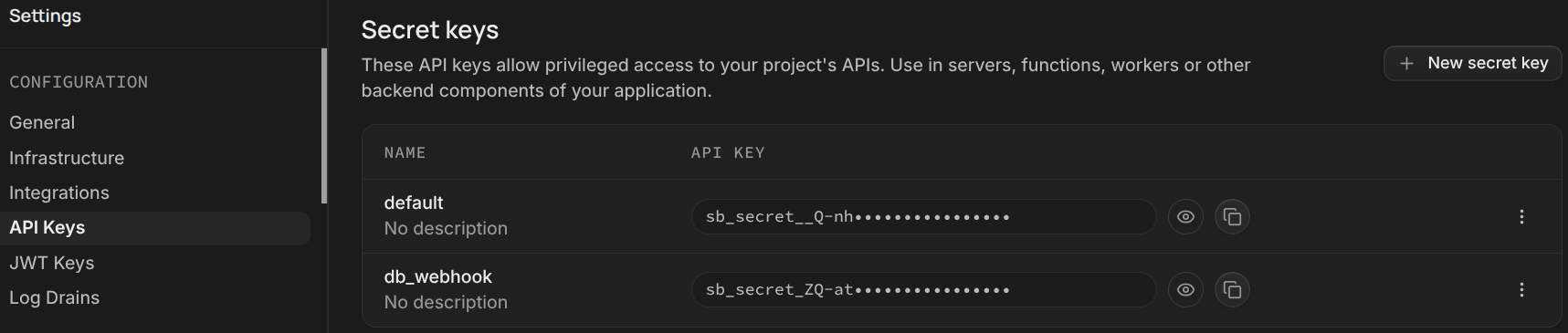
In the Supabase Dashboard, open Settings → API Keys and create a secret key named db_webhook. Use a separate key for the database, so you can rotate it on its own. While a request waits in the pg_net queue, other database roles can read the key, as Supabase explains.
2. Store the URL and Key in Vault
The trigger reads the project URL and the db_webhook key from Vault, so neither ends up in your migration files, which are usually committed to your repository. Run this in the SQL Editor:
select vault.create_secret('https://<project-ref>.supabase.co', 'project_url');
select vault.create_secret('<db_webhook secret key>', 'db_webhook_key');
Check that both secrets exist:
select name from vault.decrypted_secrets where name in ('project_url', 'db_webhook_key');
3. Create and Deploy the Function
Create the function and replace its index.ts with the code below:
npx supabase functions new on-order-created
The function accepts only server-side callers with a secret key, such as the trigger. It answers 202 right away, then applies the per-user limit, generates the invoice, uploads it to the invoices bucket, and sets pdf_path in the background. pg_net records a timeout if the function takes longer than 5 seconds to answer, so the function replies before it generates the PDF.
supabase/functions/on-order-created/index.ts
import "@supabase/functions-js/edge-runtime.d.ts";
import { withSupabase } from "@supabase/server";
import type { SupabaseClient } from "npm:@supabase/[email protected]";
import { callPdfbolt, toBase64 } from "../_shared/pdfbolt.ts";
import { invoiceHtml } from "../_shared/invoice-html.ts";
import { underPdfLimit } from "../_shared/limit.ts";

// Generates the invoice PDF for one order and stores it in the private "invoices" bucket
async function generateInvoice(admin: SupabaseClient, orderId: string) {
  // Re-read the order instead of trusting the request body
  const { data: order, error } = await admin
    .from("orders")
    .select("id, user_id, number, customer_name, currency, pdf_path, order_items (description, quantity, unit_price)")
    .eq("id", orderId)
    .maybeSingle();
  if (error) throw error;
  if (!order || order.pdf_path) return; // unknown order, or the PDF already exists

  // Every order costs a conversion, so the per-user limit applies here too
  if (!(await underPdfLimit(admin, order.user_id))) {
    throw new Error(`PDF limit reached for user ${order.user_id}`);
  }

  const pdfbolt = await callPdfbolt("/v1/direct", {
    html: toBase64(invoiceHtml(order, order.order_items)),
    format: "A4",
    printBackground: true,
  });
  if (!pdfbolt.ok) throw new Error(`PDFBolt returned ${pdfbolt.status}: ${await pdfbolt.text()}`);

  const path = `${order.user_id}/${order.id}.pdf`;
  const { error: uploadError } = await admin.storage
    .from("invoices")
    .upload(path, await pdfbolt.arrayBuffer(), { contentType: "application/pdf", upsert: true });
  if (uploadError) throw uploadError;

  await admin.from("orders").update({ pdf_path: path }).eq("id", order.id).is("pdf_path", null);
}

export default {
  // Only server-side callers get in: the "db_webhook" secret key, or the default secret key
  // (the local stack has no named keys); keys must be sent in the apikey header
  fetch: withSupabase({ auth: ["secret:db_webhook", "secret"] }, async (req, ctx) => {
    const body = await req.json().catch(() => ({}));
    // Accepts a Database Webhook payload ({ type, table, record }) or a custom { orderId } body
    if (body.type && (body.type !== "INSERT" || body.table !== "orders")) {
      return Response.json({ ignored: true });
    }
    const orderId = body.record?.id ?? body.orderId;
    if (!orderId) return Response.json({ error: "No order id in the request." }, { status: 400 });

    // Reply now; generate the PDF in the background
    EdgeRuntime.waitUntil(
      generateInvoice(ctx.supabaseAdmin, orderId).catch((e) => console.error("invoice failed", orderId, e)),
    );
    return Response.json({ accepted: true, orderId }, { status: 202 });
  }),
};
npx supabase functions deploy on-order-created
4. Add the Trigger
Create a migration for the trigger:
npx supabase migration new order_pdf_trigger
Paste the SQL below into the new migration and apply it:
supabase/migrations/20261124000005_order_pdf_trigger.sql
-- Call the on-order-created Edge Function after each new order (pg_net, asynchronous)
-- The project URL and the db_webhook secret key are read from Vault; add them once per project:
--   select vault.create_secret('https://<project-ref>.supabase.co', 'project_url');
--   select vault.create_secret('<sb_secret_… db_webhook key>', 'db_webhook_key');
create extension if not exists pg_net with schema extensions;

create or replace function public.request_order_pdf()
returns trigger
language plpgsql
-- Runs as its owner, so it can read Vault even when the user inserting the order can't
security definer
set search_path = ''
as $$
declare
  project_url text;
  api_key text;
begin
  select decrypted_secret into project_url from vault.decrypted_secrets where name = 'project_url';
  select decrypted_secret into api_key from vault.decrypted_secrets where name = 'db_webhook_key';
  if project_url is null or api_key is null then
    raise warning 'request_order_pdf: Vault secrets project_url / db_webhook_key are missing';
    return new;
  end if;

  perform net.http_post(
    url := project_url || '/functions/v1/on-order-created',
    headers := jsonb_build_object('Content-Type', 'application/json', 'apikey', api_key),
    body := jsonb_build_object('orderId', new.id),
    timeout_milliseconds := 5000
  );
  return new;
end;
$$;

revoke execute on function public.request_order_pdf() from public, anon, authenticated;

-- AFTER INSERT only: the function later updates pdf_path, which must not fire the trigger again
create trigger orders_request_pdf
  after insert on public.orders
  for each row execute function public.request_order_pdf();
npx supabase db push --remote
5. Check the Result and Retry Failed Rows
Create an order as in Test with an Order, wait a few seconds, and check that pdf_path is set:
select number, pdf_path from public.orders order by created_at desc limit 5;
If pdf_path stays empty, check the responses to the trigger's requests. pg_net keeps them in net._http_response for 6 hours:
select status_code, timed_out, content
from net._http_response
order by created desc
limit 5;
A successful call shows 202 and {"accepted":true,...}. PDFBolt errors appear in the on-order-created logs, not in this table.
To request missing PDFs again, including orders created before you added the trigger, run the query below. The function generates the PDF in the background, so wait about 10 seconds between runs. If an order still has no pdf_path after several runs, check the function logs.
-- Request the PDF again for orders that still have no file
-- Each row becomes one PDFBolt conversion. Keep the limit within your plan's
-- concurrent request limit and run the query again until it returns no rows
select net.http_post(
  url := (select decrypted_secret from vault.decrypted_secrets where name = 'project_url') || '/functions/v1/on-order-created',
  headers := jsonb_build_object(
    'Content-Type', 'application/json',
    'apikey', (select decrypted_secret from vault.decrypted_secrets where name = 'db_webhook_key')
  ),
  body := jsonb_build_object('orderId', id)
)
from public.orders
where pdf_path is null
limit 1;
Alternative: Database Webhooks
Database Webhooks in the Dashboard (Integrations → Webhooks) create a similar trigger without SQL, and on-order-created accepts their payload too.
The webhook form stores the secret key in plain text in the trigger definition, so it ends up in database dumps. The trigger above reads the key from Vault instead.
Generate Large PDFs Asynchronously
Use async conversion for large documents and for many PDFs at once. With /v1/async, PDFBolt queues the conversion and runs it in the background. When the PDF is ready, PDFBolt uploads it through the signed upload URL you pass as customS3PresignedUrl and calls a webhook. Your function doesn't wait for the conversion or hold the file in memory. Async conversion is available on paid plans.
Before you start, set up the example tables, the shared helpers, the per-user limit, and the invoices bucket.
If your webhook endpoint fails or times out, PDFBolt doesn't retry the delivery. Create the job row before you call PDFBolt and answer the webhook quickly.
The flow uses two functions and a jobs table:
request-pdf-asynccreates a row inpdf_jobs, creates a signed upload URL, and calls/v1/async.- PDFBolt uploads the PDF to Storage and calls
pdfbolt-webhook. pdfbolt-webhookverifies thex-pdfbolt-signatureheader, marks the job as succeeded or failed, and setspdf_pathon the order.
Create a migration for the jobs table and the two functions:
npx supabase migration new pdf_jobs
npx supabase functions new request-pdf-async
npx supabase functions new pdfbolt-webhook
Paste the SQL below into the new migration. Users can read the status of their own jobs, and only server-side code writes to the table:
supabase/migrations/20261124000006_pdf_jobs.sql
-- One row per asynchronous PDF request; only server-side code (secret key) writes here
create table public.pdf_jobs (
  id uuid primary key default gen_random_uuid(),
  order_id uuid not null references public.orders (id) on delete cascade,
  user_id uuid not null references auth.users (id) on delete cascade,
  storage_path text not null,
  request_id text unique,           -- PDFBolt requestId, set when PDFBolt accepts the job
  status text not null default 'pending' check (status in ('pending', 'succeeded', 'failed')),
  error_code text,
  created_at timestamptz not null default now(),
  finished_at timestamptz
);
create index on public.pdf_jobs (order_id);
create index on public.pdf_jobs (user_id);

alter table public.pdf_jobs enable row level security;
-- Users can see the status of their own jobs, nothing else
create policy "Users read own PDF jobs" on public.pdf_jobs
  for select to authenticated using (user_id = (select auth.uid()));
Copy the webhook signature key from Webhook Signature on the API Credentials page. It is not your API key. Store it as a secret:
npx supabase secrets set PDFBOLT_WEBHOOK_SECRET=<webhook-signature-key>
supabase/functions/request-pdf-async/index.ts
import "@supabase/functions-js/edge-runtime.d.ts";
import { withSupabase } from "@supabase/server";
import { callPdfbolt, toBase64 } from "../_shared/pdfbolt.ts";
import { invoiceHtml } from "../_shared/invoice-html.ts";
import { underPdfLimit } from "../_shared/limit.ts";

export default {
  fetch: withSupabase({ auth: "user" }, async (req, ctx) => {
    const { orderId } = await req.json().catch(() => ({}));
    if (!orderId) return Response.json({ error: "Send JSON with an `orderId`." }, { status: 400 });

    const { data: order, error } = await ctx.supabase
      .from("orders")
      .select("id, user_id, number, customer_name, currency, order_items (description, quantity, unit_price)")
      .eq("id", orderId)
      .maybeSingle();
    if (error) return Response.json({ error: error.message }, { status: 500 });
    if (!order) return Response.json({ error: "Order not found." }, { status: 404 });

    if (!(await underPdfLimit(ctx.supabaseAdmin, ctx.userClaims!.id))) {
      return Response.json({ error: "PDF limit reached. Try again later." }, { status: 429 });
    }

    // 1. Signed upload URL: PDFBolt uploads the finished PDF straight into your private bucket
    const path = `${order.user_id}/${order.id}.pdf`;
    const { data: upload, error: uploadError } = await ctx.supabaseAdmin.storage
      .from("invoices")
      .createSignedUploadUrl(path, { upsert: true });
    if (uploadError) return Response.json({ error: uploadError.message }, { status: 500 });

    // 2. Create the job row before calling PDFBolt, so an early webhook always finds it
    const { data: job, error: jobError } = await ctx.supabaseAdmin
      .from("pdf_jobs")
      .insert({ order_id: order.id, user_id: order.user_id, storage_path: path })
      .select("id")
      .single();
    if (jobError) return Response.json({ error: jobError.message }, { status: 500 });

    // 3. Queue the conversion; the job ID in the URL only selects the row and doesn't authenticate the webhook
    const webhook = `${Deno.env.get("SUPABASE_URL")}/functions/v1/pdfbolt-webhook?job=${job.id}`;
    const pdfbolt = await callPdfbolt("/v1/async", {
      html: toBase64(invoiceHtml(order, order.order_items)),
      format: "A4",
      printBackground: true,
      webhook,
      customS3PresignedUrl: upload.signedUrl,
    });
    const result = await pdfbolt.json().catch(() => null);
    if (!pdfbolt.ok) {
      await ctx.supabaseAdmin.from("pdf_jobs")
        .update({ status: "failed", error_code: result?.errorCode ?? `HTTP_${pdfbolt.status}`, finished_at: new Date().toISOString() })
        .eq("id", job.id);
      return Response.json({ error: "PDF generation failed.", pdfboltStatus: pdfbolt.status, details: result }, { status: 502 });
    }

    // 4. Save the requestId (unless the webhook was faster and already stored it)
    await ctx.supabaseAdmin.from("pdf_jobs")
      .update({ request_id: result.requestId })
      .eq("id", job.id)
      .is("request_id", null);

    return Response.json({ jobId: job.id, status: "pending" }, { status: 202 });
  }),
};
supabase/functions/pdfbolt-webhook/index.ts
import "@supabase/functions-js/edge-runtime.d.ts";
import { withSupabase } from "@supabase/server";

const encoder = new TextEncoder();

// Check the x-pdfbolt-signature header: "sha256=" + hex HMAC-SHA256 of the raw body
async function isValidSignature(rawBody: string, header: string | null): Promise<boolean> {
  const secret = Deno.env.get("PDFBOLT_WEBHOOK_SECRET");
  if (!secret || !header?.startsWith("sha256=")) return false;
  const hex = header.slice("sha256=".length);
  if (!/^[0-9a-f]{64}$/i.test(hex)) return false;
  const signature = new Uint8Array(hex.match(/../g)!.map((h) => parseInt(h, 16)));
  const key = await crypto.subtle.importKey(
    "raw", encoder.encode(secret), { name: "HMAC", hash: "SHA-256" }, false, ["verify"],
  );
  return crypto.subtle.verify("HMAC", key, signature, encoder.encode(rawBody)); // constant-time
}

export default {
  // "none": PDFBolt sends no Supabase credentials; the HMAC signature is the authentication
  fetch: withSupabase({ auth: "none" }, async (req, ctx) => {
    const rawBody = await req.text(); // read the raw text before parsing
    if (!(await isValidSignature(rawBody, req.headers.get("x-pdfbolt-signature")))) {
      return Response.json({ error: "Invalid signature." }, { status: 401 });
    }
    const event = JSON.parse(rawBody);
    const jobId = new URL(req.url).searchParams.get("job");
    if (!jobId) return Response.json({ error: "Missing job." }, { status: 400 });

    const admin = ctx.supabaseAdmin;
    const { data: job } = await admin.from("pdf_jobs").select("*").eq("id", jobId).maybeSingle();
    if (!job) return Response.json({ error: "Unknown job." }, { status: 404 });

    if (job.request_id !== event.requestId) {
      // The webhook can arrive before request-pdf-async saved the requestId
      // Bind it only to a fresh pending job that has no requestId yet
      const freshSince = new Date(Date.now() - 15 * 60 * 1000).toISOString();
      const { data: bound } = await admin.from("pdf_jobs")
        .update({ request_id: event.requestId })
        .eq("id", jobId).is("request_id", null).eq("status", "pending").gt("created_at", freshSince)
        .select("id");
      if (bound?.length !== 1) return Response.json({ error: "Job does not match this request." }, { status: 409 });
    }
    if (job.status !== "pending") return Response.json({ ok: true, duplicate: true }); // already handled

    if (event.status === "SUCCESS") {
      await admin.from("pdf_jobs").update({ status: "succeeded", finished_at: new Date().toISOString() })
        .eq("id", jobId).eq("status", "pending");
      await admin.from("orders").update({ pdf_path: job.storage_path }).eq("id", job.order_id);
    } else {
      await admin.from("pdf_jobs")
        .update({ status: "failed", error_code: event.errorCode, finished_at: new Date().toISOString() })
        .eq("id", jobId).eq("status", "pending");
    }
    return Response.json({ ok: true });
  }),
};
How the webhook handler is protected:
- It uses
auth: "none"withverify_jwt = false, because PDFBolt sends no Supabase credentials. The HMAC signature replaces Supabase auth, and a missing or invalid signature returns401. - It reads the body as text before parsing it, because the signature covers the raw body.
If you use the Node.js SDK, PDFBolt.webhooks.verifySignature() does the same check.
Apply the migration, deploy, and test:
npx supabase db push --remote
npx supabase functions deploy request-pdf-async pdfbolt-webhook
curl --fail-with-body --show-error -X POST 'https://<project-ref>.supabase.co/functions/v1/request-pdf-async' \
  -H 'Authorization: Bearer <access-token>' \
  -H 'Content-Type: application/json' \
  -d '{"orderId": "<order-id>"}'
The function returns 202 with a jobId. After a few seconds, check the job in the SQL Editor:
select status, error_code, finished_at
from public.pdf_jobs
order by created_at desc
limit 1;
status should be succeeded. Your app can show the job status by reading pdf_jobs.
A job that stays pending means the webhook never arrived or was rejected. Find such jobs:
select id, order_id, created_at
from public.pdf_jobs
where status = 'pending' and created_at < now() - interval '10 minutes'
order by created_at;
To generate a missing PDF, call request-pdf-async again as the order's owner, for example from a Retry button in your app.
Supabase Edge Function Timeouts and Limits
Supabase limits each Edge Function's response time, wall-clock time, CPU time, and memory. See Supabase Edge Function limits for the current values. A PDFBolt conversion stops after its timeout (30 seconds by default, 60 seconds at most), well before the 150 seconds an Edge Function has to start its response. With large PDFs, memory is the limit you're more likely to hit.
Tested with Supabase Edge Runtime 1.79.1 (November 2026): streaming the PDF to the caller worked up to 144 MB on a paid PDFBolt plan. Loading the whole PDF into memory with arrayBuffer() worked at 48 MB and failed at 96 MB with a 546 error (WORKER_RESOURCE_LIMIT).
Stream the response when you can. For large files that must be stored, use direct upload or async conversions.
Run Edge Functions Locally
To test the functions on your machine, follow Supabase local development and serve them with your secrets:
npx supabase functions serve --env-file supabase/functions/.env
supabase/functions/.envholds the same secrets you set withsecrets set, for examplePDFBOLT_API_KEY. Don't commit this file.- For the database trigger, store
http://host.docker.internal:54321asproject_urlin the local Vault. The local stack has no named secret keys, so store the default secret key asdb_webhook_key, whichon-order-createdalso accepts. - PDFBolt can't reach your machine, so async conversions and direct upload work only after you deploy.
Troubleshooting
Check the function logs first: Supabase Dashboard → Edge Functions → your function → Logs. Also check PDFBolt's Request Logs, which show each conversion with its error and webhook delivery result. In the browser, every non-2xx response arrives as a FunctionsHttpError ("Edge Function returned a non-2xx status code"). Read the JSON body with error.context.json().
401 errors from the function
| Symptom | Cause | Fix |
|---|---|---|
MISSING_CREDENTIALS | No Authorization header | Sign the user in. supabase.functions.invoke() sends the token |
401 with a token that worked before | User access tokens expire after 1 hour by default | Get a new token, or let supabase-js refresh the session |
UNUSABLE_CREDENTIAL: "an apikey header, which no accepted auth mode reads", or INVALID_JWT | Only the publishable key or a legacy anon key was sent, without a signed-in user | Call the function as a signed-in user |
PDF generation errors and broken PDFs
The functions return PDFBolt errors as 502, with PDFBolt's HTTP status in pdfboltStatus and its JSON error in details. For all PDFBolt error codes, see Error Handling.
| Symptom | Cause | Fix |
|---|---|---|
500 WORKER_ERROR: "Function exited due to an error" | An uncaught exception in the function | Check the function logs for the error |
500 from html-to-pdf: "The PDFBOLT_API_KEY secret is not set.", or errorCode: MISSING_API_KEY in details from the other functions | The secret is missing | npx supabase secrets set PDFBOLT_API_KEY=... |
429: "PDF limit reached. Try again later." | The per-user limit from limit.ts | Wait, or raise PDF_LIMIT_PER_HOUR |
pdfboltStatus: 401, errorCode: UNAUTHORIZED | Wrong PDFBolt API key | Copy the key from API Credentials |
pdfboltStatus: 429, errorCode: TOO_MANY_REQUESTS | PDFBolt rate limit | Disable the button while the PDF is generating, retry with backoff, or upgrade |
pdfboltStatus: 403, errorCode: FORBIDDEN | No remaining conversions, or a feature your plan doesn't include | Check your plan and usage in the PDFBolt dashboard |
pdfboltStatus: 413, errorCode: PAYLOAD_TOO_LARGE | The request is over your plan's size limit | Send less HTML, use a template, or upgrade |
pdfboltStatus: 413, errorCode: PDF_SIZE_TOO_LARGE | The PDF is larger than your plan allows | Use compression, reduce the PDF size, or upgrade |
pdfboltStatus: 422, errorCode: CONVERSION_TIMEOUT | The page wasn't ready within the timeout | Adjust timeout, waitUntil, or waitForFunction |
pdfboltStatus: 400, "... has no active version" | The template isn't published | Publish it in Templates |
Non-Latin characters are broken or btoa throws | HTML encoded with btoa() alone | Encode UTF-8 first, as in toBase64() |
| Broken image icon in the PDF | Image in a private bucket | Use a signed URL or a public bucket |
| Web font not used | Default waitUntil: "load" | Add waitUntil: "networkidle" |
546 WORKER_RESOURCE_LIMIT | A very large PDF loaded into memory | Stream the response or use direct upload |
Storage, database trigger, async, and CLI
| Symptom | Cause | Fix |
|---|---|---|
CUSTOM_S3_UPLOAD_ERROR with "The object exceeded the maximum allowed size" | The PDF is larger than your Supabase project's file size limit | See Storage file limits |
| Invoice without items | Items saved after the order, in a separate request | Use create_order (one transaction) |
pdf_path stays null after an insert | The conversion failed, or the order's user reached the per-user limit. Failures are not retried | Check the on-order-created logs, then run the retry query |
No new row in net._http_response after an insert | The Vault secret project_url or db_webhook_key is missing or misnamed. The trigger then raises a warning instead of calling the function | Run the check query from step 2 and add the missing secret |
net._http_response shows 401 | db_webhook_key in Vault isn't a valid secret key | Store the correct db_webhook secret key in Vault |
A pdf_jobs row stays pending, and the Webhook Result column in PDFBolt's Request Logs shows 401 | verify_jwt = true for pdfbolt-webhook, so the Supabase gateway rejects PDFBolt's request with UNAUTHORIZED_NO_AUTH_HEADER | Set verify_jwt = false, redeploy, and request the PDF again |
PGRST202: "Could not find the function ... in the schema cache" right after a migration | The API schema cache is not refreshed yet | Wait a few seconds and retry |
db push changes only the local database | Supabase CLI 3 targets the local stack by default | Add --remote |
DbPushMissingRemoteError: "Found local migration files to be inserted before the last migration on remote database" | A migration file is older than one already applied | Rename the file with a newer timestamp, or run db push --remote --include-all |
FAQ
Can I run Puppeteer or headless Chrome in a Supabase Edge Function?
Supabase recommends running headless browsers as an external service because of Edge Function size and resource limits. See Supabase troubleshooting. With PDFBolt, a PDF generation API, the Edge Function sends one HTTPS request and PDFBolt renders the page in Chrome.
What is the Supabase Edge Function timeout?
An Edge Function must start its response within 150 seconds or it returns 504. Wall-clock time per worker is 150 seconds on the Supabase Free plan and 400 seconds on paid plans. A PDFBolt conversion times out after 30 seconds by default and 60 seconds at most, so it ends before the response deadline.
How much do Supabase Edge Functions cost?
As of November 2026, the Supabase Free plan includes 500,000 Edge Function invocations per month and the Pro plan includes 2 million, then $2 per million. Check the Supabase pricing page for current prices. PDFBolt conversions are billed separately: the PDFBolt Free plan includes 50 PDF documents per month, and no credit card is required. See Pricing.
Does this guide work on the PDFBolt Free plan?
Yes, except direct upload from PDFBolt to Supabase Storage and asynchronous conversion, which need a paid plan. See Pricing for plan limits.
Can I generate PDFs in an existing Edge Function that uses Deno.serve?
Yes. Functions written with Deno.serve and createClient from supabase-js still work and can call PDFBolt with fetch in the same way. New functions from supabase functions new use withSupabase from @supabase/server.
Related Documentation
📄️ Conversion Parameters
Set page size, margins, headers and footers, and wait options
📄️ PDF Templates
Design a layout once and fill it with data from your database
📄️ Async Conversion
Queue conversions and get the result through a signed webhook
📄️ Node.js SDK
Call PDFBolt with the official SDK, which also runs in Edge Functions
📄️ PDF MCP Server
Let your coding agent create, preview, and publish templates
📄️ Error Handling
See all error codes, the response format, and retry guidance